



Download Unified Search – powerful Firefox add-on for multi‑engine results
Overview
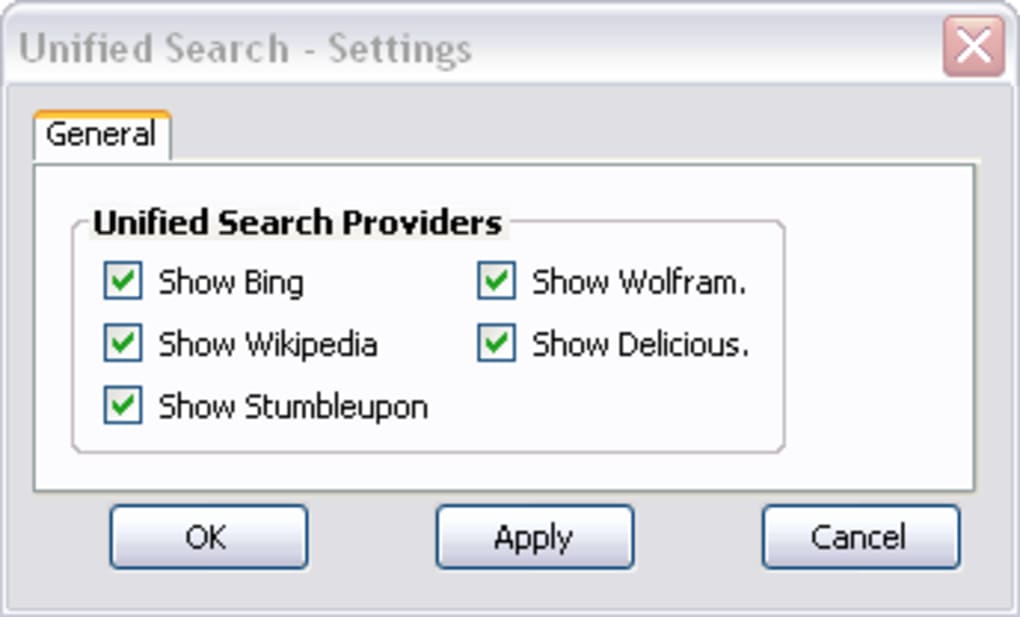
Unified Search is a free, lightweight Firefox add‑on designed to broaden the scope of every web query you perform. Instead of waiting for a single set of results, the extension populates the right‑hand side of your standard search page with live snippets from five additional knowledge sources: Bing, Wikipedia, StumbleUpon, Wolfram Alpha, and Delicious. The layout is clean, the sidebar can be resized, and each provider can be toggled on or off from a simple options window located under Tools > Add‑ons.
Because the extra results appear alongside your primary engine (usually Google), you instantly get a comparative view that helps you decide which source delivers the most relevant answer. For example, a mathematical query often shines on Wolfram Alpha, while a cultural reference may be better covered by Wikipedia. Unified Search respects your privacy – it never transmits personal data beyond what each third‑party engine already receives, and all communication is conducted over HTTPS, making the experience both secure and fast.
Although the current version limits you to five extra providers, the add‑on’s modular design promises future updates that could add more engines, custom styling, and deeper integration with Firefox’s built‑in search settings. In short, Unified Search turns a single search box into a multi‑search hub, saving you time, clicks, and the occasional frustration of opening separate tabs just to compare results.
Key Features
- Simultaneous display of results from five alternative providers (Bing, Wikipedia, StumbleUpon, Wolfram Alpha, Delicious).
- Fully configurable engine list – enable, disable, or reorder providers in the options panel.
- One‑click pop‑out: move any sidebar result to a new tab for deeper exploration.
- Responsive sidebar that automatically resizes to match the main search page layout.
- Secure HTTPS connections for all external queries, preserving user privacy.
- Lightweight footprint – the add‑on adds less than 150 KB to your Firefox profile.
- Automatic updates via Firefox’s add‑on marketplace, ensuring you always have the latest features.
Installation & Usage Instructions
Getting Unified Search up and running takes just a few minutes, even for users who are new to Firefox extensions. First, open Firefox and navigate to the official Mozilla Add‑ons site. Search for “Unified Search” or follow a direct download link from the developer’s homepage.
Click the Add to Firefox button; a confirmation dialog will appear, asking you to grant the extension permission to read and modify your search results. Accept the request, and Firefox will automatically download, install, and enable the add‑on. Once installed, you’ll notice a new icon on the toolbar – a small magnifying glass with a sidebar silhouette.
Click this icon to open the configuration window, where you can toggle each of the five providers, adjust the sidebar width, and choose whether results open in the same window or a new tab. The changes are saved instantly, so you can start using the tool without restarting the browser. To perform a search, simply type your query into the address bar or the search box on any website, press Enter, and the main results will load as usual.
Within seconds, Unified Search will pull in parallel results and display them on the right side of the page. If you find a result that looks promising, hover over its header and click the “pop‑out” icon to launch the full page in a separate tab. Should you wish to temporarily hide a provider, just click the “X” button on its sidebar pane; you can reactivate it later from the options menu.
For users who prefer a minimal interface, the add‑on can be disabled entirely via Tools > Add‑ons > Extensions and re‑enabled whenever needed. Regular updates are pushed through Firefox’s built‑in update system, so you’ll always have the latest performance improvements and security patches without manual intervention.
Compatibility & System Requirements
Unified Search is built specifically for the desktop version of Mozilla Firefox and is compatible with Firefox 78 and newer. Because Firefox runs on Windows, macOS, and Linux, the add‑on inherits cross‑platform support automatically – you can download and use Unified Search on Windows 10/11, macOS Ventura or later, and popular Linux distributions such as Ubuntu, Fedora, and Debian. Mobile versions of Firefox (Android and iOS) do not currently support legacy extensions, so Unified Search is limited to desktop browsers at this time.
The extension requires no additional software, and its memory consumption stays under 30 MB even when all five providers are active. For optimal performance, ensure that your Firefox installation is up‑to‑date; the add‑on leverages the latest WebExtension APIs that are only available in recent releases. Users running older operating systems (e.g., Windows 7) can still install Firefox 78 LTS, which retains compatibility with Unified Search, though you may miss out on newer security enhancements.
In enterprise environments, administrators can deploy Unified Search via Group Policy or Mozilla’s Enterprise Policy Engine, allowing centralized control over which providers are enabled for employees. Overall, the add‑on’s lightweight design means it works smoothly on modest hardware, making it an excellent productivity booster for students, researchers, and power users alike.
Pros and Cons
Pros
- Instant access to multiple search engines without leaving the current page.
- Highly configurable – turn providers on/off or reorder them with a few clicks.
- Secure HTTPS connections protect your data across all providers.
- Lightweight and fast; adds minimal overhead to Firefox’s performance.
- Free to download and receives automatic updates through the Mozilla marketplace.
Cons
- Only five alternative providers are available in the current release.
- Not compatible with Firefox for Android or iOS, limiting mobile usage.
- Sidebar may occupy screen space on low‑resolution monitors.
- Advanced users may wish for deeper customization (e.g., custom CSS, API keys).
- Results from some providers (e.g., Delicious) may feel dated or less relevant.
Frequently Asked Questions
Can I add my own search engines to Unified Search?
At present the add‑on ships with a fixed list of five providers. Future versions are expected to include a custom‑engine manager, but for now you can only enable or disable the built‑in options.
Does Unified Search collect any personal data?
No. The extension simply forwards your query to the selected third‑party engines over HTTPS. It does not store, log, or transmit any additional information about you.
Will the add‑on slow down my browsing experience?
Unified Search is designed to be lightweight. The extra requests are made asynchronously, so the main search results load first, and the sidebar populates shortly after. Most users report negligible impact on page load times.
How do I update Unified Search?
Updates are delivered through Firefox’s built‑in add‑on manager. When a new version is available, Firefox will automatically download and install it, or you can manually check for updates under Tools > Add‑ons > Extensions.
Is Unified Search compatible with enterprise deployments?
Yes. Administrators can use Mozilla’s Enterprise Policy Engine or Group Policy to pre‑install the add‑on and enforce which providers are enabled, making it suitable for corporate environments.
Conclusion & Call to Action
Unified Search delivers exactly what its name promises – a unified, side‑by‑side view of multiple search engines without the hassle of opening new tabs or juggling bookmarks. For anyone who spends a lot of time researching, fact‑checking, or simply loves to compare sources, the add‑on offers a noticeable productivity boost. While the current selection of five extra providers is modest, the tool’s clean interface, secure design, and zero‑cost download make it a compelling addition to any Firefox setup. As the developer continues to refine the extension, we can anticipate more engines, richer customization, and perhaps even mobile support. If you’re ready to expand the power of your everyday searches, click the button below to download Unified Search from the official Mozilla Add‑ons store and start enjoying richer, faster results today.
Unified Search provides a smooth, secure, and highly useful experience for anyone looking to broaden their search horizons. The five built‑in providers cover a wide range of topics, and the ability to pop out results into new tabs is a thoughtful touch. Though limited to desktop Firefox and a fixed list of engines, the add‑on’s performance and ease of use earn it a solid four‑star rating.







